
The screenshots show ScoreStory in Dutch. The app itself speaks your language: pick it under your account.
Organisation → Subscription shows, on one screen, what you are on, how many participants you have had this period, what that costs, and every invoice. Admins only.
Cannot see the tab? Then this environment runs without subscriptions — nothing is invoiced and no limits apply.
Choosing when you create the organisation
When you create an organisation you choose, there and then, which plan it is on: Free or one of the bundles. Choose Free and you are done — you land with Vox, who helps you set up a survey. Choose a bundle and you go straight on to your invoice details and payment method, the same steps as in the wizard below. Abandon that and your organisation is still there, on the free plan; you can always subscribe later.
You can create two organisations on the free plan. Organisations you have since deleted still count. Create a third and the Free card is greyed out, with the reason on it, and you pick a bundle. That organisation gets no free interviews: interviews start once your payment has gone through. Only organisations you create yourself count, not the ones you were invited to. Need more free organisations for a good reason? Get in touch with support.
The free plan
Free is free: no card, no direct debit mandate, nothing to fill in first, and no end date. The free plan has one limit: ten interviews in total. Until then you can do everything the app offers: build questionnaires, send invitations, run interviews, read results and export them.
One thing you cannot do: add your own sending domain. That takes DNS work on our side and yours, and we only do it once there is a subscription. On the free plan you send from the ScoreStory platform address, which works fine.
The Subscription page shows how many free interviews you have left. When only a few remain it also says so at the top of the screen, with a button to take out a subscription.
Ten interviews used up? Then no new interviews start; someone you invite sees a tidy screen instead of an interview. Creating invitations, editing surveys, reading results — all of that keeps working, and nothing is ever deleted. Take out a subscription and interviews run again.
Taking out a subscription
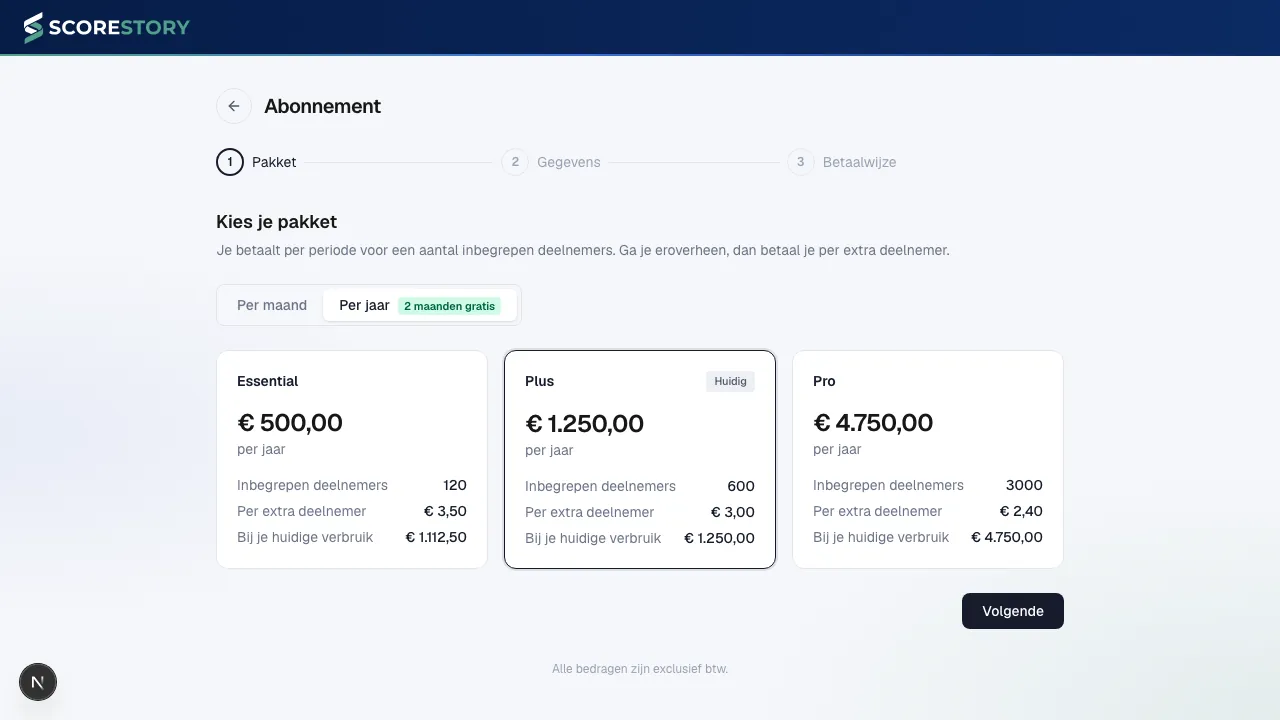
Click Take out a subscription and you land on a screen with three steps and nothing else — no menus, just a back arrow top-left.
- Bundle. Three bundles side by side, each with its price, the participants included, the rate per extra participant, and what it would cost you this period at your current usage. At the top you choose monthly or yearly.
- Details. Company name, VAT number, address and the e-mail address invoices should go to. Fields marked with an asterisk are required.
- Payment method. Direct debit or credit card. Finish sends you on to confirm your payment method. As soon as that succeeds your subscription starts and your first invoice goes out.
To change it later, use Change subscription on the Subscription page. It is the same wizard: you step through it with your current choices already filled in, and your existing payment method can stay as it is.
When does someone count as a participant?
Someone counts once they have started the questionnaire and given at least one answer. That first answer may be the score or a written or spoken reply in the interview — whichever comes first.
What does not count:
- someone who opens the invitation but fills in nothing;
- an interview you start yourself with the Test survey button;
- how many messages they send afterwards. One participant is one participant, even after a twenty-turn interview.
Bundles
You pick a bundle with a number of included participants. Go past it and you pay per extra participant; that rate gets lower as the bundle gets bigger.
The wizard's first step also shows, per bundle, what you would pay this period at your current number of participants. That line is not decoration: the price list does not rise evenly everywhere. There are bands where a larger bundle is cheaper than a smaller one plus loose participants — the crossings are at 32 and 167 participants. If you are in such a band, the saving is shown above the usage bar. You do not have to do anything: switching is a choice, not an obligation.
Monthly or yearly
- Monthly — a fresh pool of participants every month.
- Yearly — you pay for ten months out of twelve, and the participants are pooled across the whole year. A quiet summer and a busy autumn even out. For research that arrives in waves this is usually the better shape.
Switching bundle mid-period? You pay the old bundle up to the switch and the new one after it. Both amounts appear as separate lines on your invoice so you can check the arithmetic.
The ceiling
The ceiling belongs to a subscription and appears once you have one; during your free plan the ten interviews are the limit and there is nothing to set.
Next to the bundle sits a ceiling, as a percentage of your bundle. The default is 300%: with 50 included participants, at most 150 in a period. It cannot go below 100% — that would refuse participants you have already paid for.
Under the field you can see what an interview above your bundle costs, and what you would pay on top if you filled the ceiling completely. That figure updates as you type another percentage, so you see what you are setting before you save.
The ceiling exists so an open link that travels further than you expected does not become a surprise invoice. You set it yourself; if you are expecting a spike, raise it in advance.
What happens around the ceiling:
- Well below it — nothing. The meter simply keeps counting.
- From 80% — a notice at the top of the screen, on every page of your organisation settings.
- At the ceiling — new participants see a tidy message instead of an interview. Interviews already in progress are never cut off.
Free accounts
Some workspaces are free — a pilot, a partner, or an internal workspace. The page then says at the top that this account is free, with the reason. Usage is still measured and the costs are still calculated (so you can see what it would cost), but nothing is invoiced and no ceiling applies.
The same is true on a test environment: you see your usage and the amounts that go with it, but you never run into a limit.
Payment method
Your current payment method is on the Subscription page, with a Change button beside it. You confirm the new one at Mollie; nothing extra is invoiced, because the period you are in is already paid for. Direct debit costs one cent to confirm, a card costs nothing.
Taking out a subscription for the first time, the wizard's third step is where you choose how you pay:
Either way you pay for the first period there and then, VAT included, and that same payment authorises us for the periods after it.
- Direct debit (recommended) — you pay by Wero. After that the cost per collection is flat, whatever the amount. On a large subscription that is roughly €15 a month less than a card.
- Credit card — you pay by card. Convenient, but the transaction fee scales with the amount.
Subscribing from the free plan? Your subscription starts there and then. An invoice goes out immediately, and that belongs to a period that genuinely begins.
Invoicing and VAT
The bundle is paid in advance, the extra participants in arrears. That split follows from what each one is: the bundle price is fixed before the period starts, and how many people take part is only known once it has ended.
One invoice per period boundary covers both:
| When | What is on it |
|---|---|
| On subscribing | the bundle for the first period |
| End of a period | the extra participants of that period, plus the bundle for the next |
| After cancelling | the extra participants of your final period only |
One rule decides when a switch takes effect: gain something and it happens now; give something up and it waits for your current period to end.
- To a larger bundle — you have the bigger pool straight away, so you get an invoice for it straight away. The difference is settled over the remaining part of the period; the part you already had was billed correctly.
- To a smaller bundle — that waits until your current period ends. Until then you keep the bundle you already paid for, and nothing about your invoice changes right now. The Subscription page shows a notice with the date it takes effect, and a button to cancel it if you change your mind.
- Yearly to monthly waits for the same reason: the year is bought and cannot be unbought.
- Monthly to yearly does take effect immediately — that is a longer commitment paid up front. Your current period is closed there and then: any extra participants are billed, the unused part of your bundle is credited back, and your year starts that same day. Your billing date moves with it.
Every invoice reaches you by email with a PDF, and they are all listed at the bottom of this page.
Fill in your billing details before the first invoice is drawn up — they are frozen at the moment of issue, so a later edit does not change earlier invoices.
On VAT:
- Netherlands — 21%.
- EU outside the Netherlands, with a valid VAT number — reverse-charged, 0%.
- EU outside the Netherlands, without a valid VAT number — 21%.
- Outside the EU — outside the scope of VAT, 0%.
Your VAT number is checked against VIES, the European Commission's verification service. That service is regularly unavailable; nothing is held up by it. Until the check succeeds we charge 21%, and as soon as it succeeds the next invoice is already correct.
If a payment fails
A failed collection is usually a balance or card problem and resolves itself. We try again on days 1, 3, 7 and 14. You can see where it stands on this page and in the notice at the top of the screen.
During that time only sending invitations and creating new surveys are switched off. Everything already in place keeps working: interviews from invitations already sent carry on, and your results and participants stay visible. Nothing is ever deleted.
If the account has been closed or the mandate withdrawn, retrying is pointless. We ask you for a new payment method instead; as soon as there is one, the outstanding invoice is collected after all.
Cancelling
You can cancel once you have a subscription — the free plan needs no cancelling, it costs nothing and simply carries on.
You cancel at the bottom of the page. Your subscription stops at the end of the period you have already paid for — never mid-period, because the participants you have already invited need to be able to finish their interview. Until then you can undo the cancellation with one click.
← Organization settings · Table of contents · Next: Glossary →